> ## Documentation Index
> Fetch the complete documentation index at: https://docs.pulseairtest.com/llms.txt
> Use this file to discover all available pages before exploring further.
# Backward compatibility
## Using new air receivers with a previous generation controller
It is possible to connect Pulse 3.0 air receivers to an older Pulse 2.0 controller with the addition of an external PoE+ switch.
The switch will be used to power both the Pulse 2.0 controller and the Pulse 3.0 air receivers.
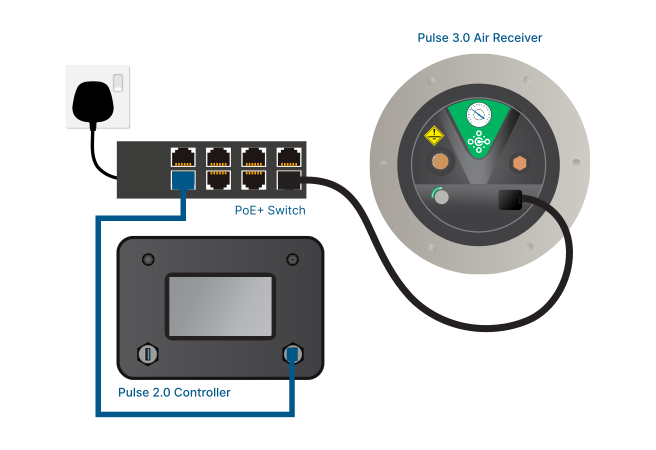 A PoE+ (Power over Ethernet) switch is a device that combines power and data over an Ethernet cable.
The PoE+ switch must support the 802.3at protocol and be capable of supplying 30W of power per connected air receiver.
> Contact our sales team to purchase a standalone PoE+ switch.
## Using a new controller with previous generation air receivers
Previous Pulse 2.0 air receivers were powered directly from the mains as opposed to receiving power from the controller.
They can be used with newer Pulse 3.0 controllers, provided they remain powered independently and have received a software update to make them compatible.
A PoE+ (Power over Ethernet) switch is a device that combines power and data over an Ethernet cable.
The PoE+ switch must support the 802.3at protocol and be capable of supplying 30W of power per connected air receiver.
> Contact our sales team to purchase a standalone PoE+ switch.
## Using a new controller with previous generation air receivers
Previous Pulse 2.0 air receivers were powered directly from the mains as opposed to receiving power from the controller.
They can be used with newer Pulse 3.0 controllers, provided they remain powered independently and have received a software update to make them compatible.
 ### Powering older air receivers
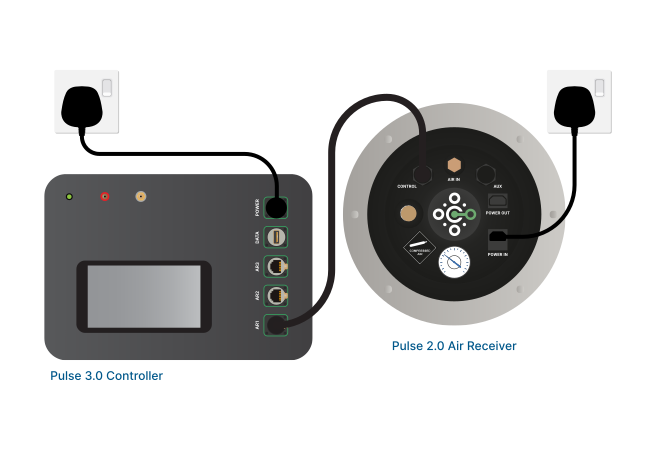
When using a Pulse 2.0 air receivers with a Pulse 3.0 controller, the air receiver must be powered directly from mains electricity via the original IEC power cord.
The *CONTROL* port of the air receiver is connected directly to the controller, but it will be used for data only (not power).
### Powering older air receivers
When using a Pulse 2.0 air receivers with a Pulse 3.0 controller, the air receiver must be powered directly from mains electricity via the original IEC power cord.
The *CONTROL* port of the air receiver is connected directly to the controller, but it will be used for data only (not power).
 ### Updating older air receivers to the latest firmware
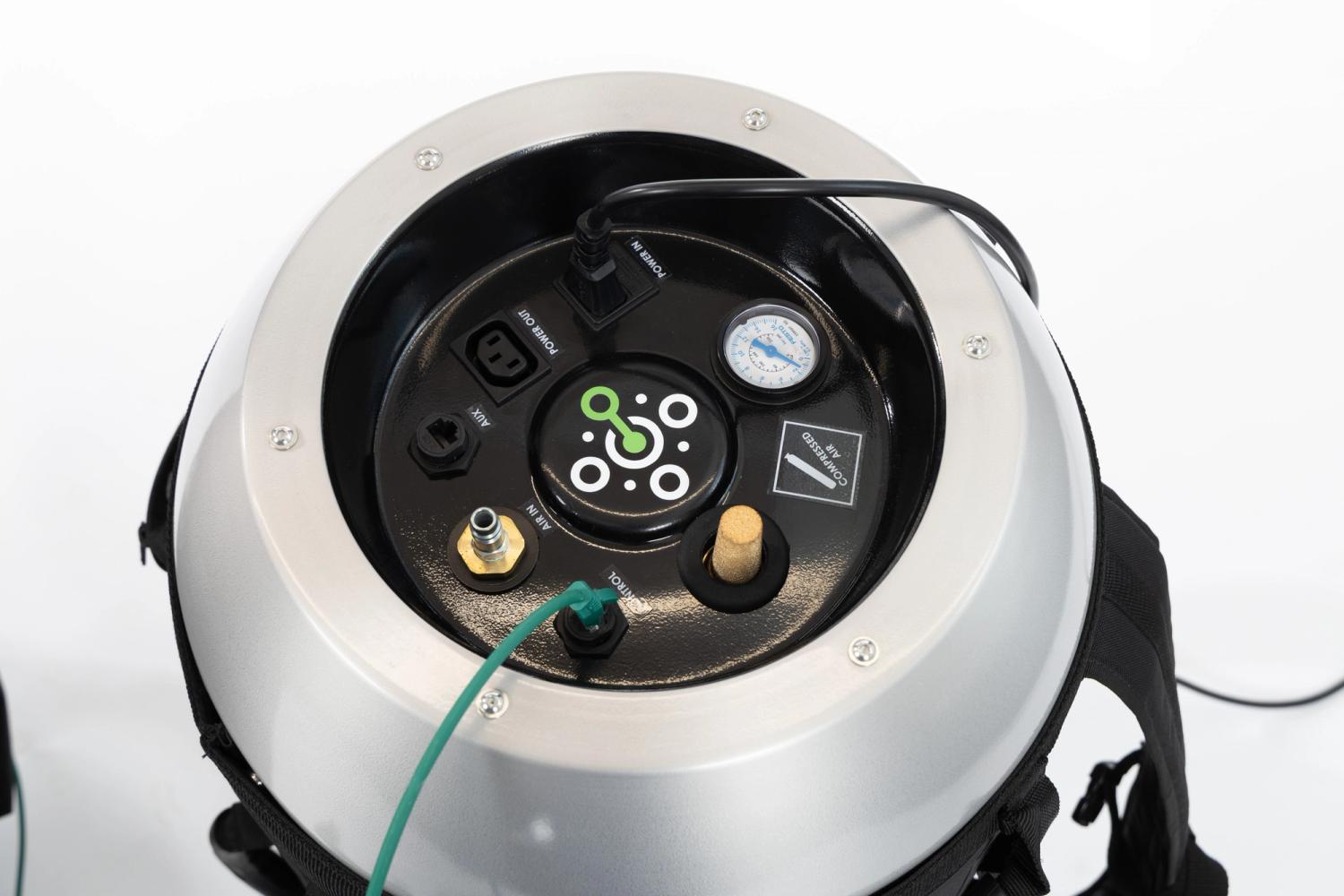
To update Pulse 2.0 air receivers to be compatible with Pulse 3.0 controllers, they should be powered on and connected to the controller.
On the *System Status* screen, there will be an option to upgrade the firmware of each connected air receiver to make it compatible with the controller version.
Refer to updating the air receiver firmware for more information.
### Charging older air receivers
The software-controlled charging feature of the Pulse 3.0 controllers is not compatible with older Pulse 2.0 air receivers.
As a result, to stop charging Pulse 2.0 air receivers, the power must be manually turned off on the compressor, as per existing procedures.
### Draining older air receivers
Pulse 2.0 air receivers require power and a data connection to a controller to use the drain functionality. They cannot be drained manually.
Refer to draining Pulse 2.0 air receivers for more information.
### Updating older air receivers to the latest firmware
To update Pulse 2.0 air receivers to be compatible with Pulse 3.0 controllers, they should be powered on and connected to the controller.
On the *System Status* screen, there will be an option to upgrade the firmware of each connected air receiver to make it compatible with the controller version.
Refer to updating the air receiver firmware for more information.
### Charging older air receivers
The software-controlled charging feature of the Pulse 3.0 controllers is not compatible with older Pulse 2.0 air receivers.
As a result, to stop charging Pulse 2.0 air receivers, the power must be manually turned off on the compressor, as per existing procedures.
### Draining older air receivers
Pulse 2.0 air receivers require power and a data connection to a controller to use the drain functionality. They cannot be drained manually.
Refer to draining Pulse 2.0 air receivers for more information.